
Table of Contents
ToggleTechnical SEO Checklist for Bloggers: Fix These 10 Things to Rank Faster
When I first started blogging, I spent weeks writing what I thought was really good content. I optimized my headings, added keywords, and published regularly. But Google barely noticed my blog existed.
Then I discovered the real problem — my blog had serious technical SEO issues that were silently blocking Google from properly crawling and ranking my content. Once I fixed them, things started moving.
If your blog isn’t getting the organic traffic it deserves, this technical SEO checklist for bloggers is exactly what you need. No coding required. No paid tools. Just 10 practical fixes you can do today.
Here’s what you’ll get from this guide
- A free, complete technical SEO checklist for bloggers in 2026
- Step-by-step instructions for each fix
- Free tools to check and monitor everything
- A downloadable PDF checklist at the end
Let’s fix your blog’s foundation.
Why Technical SEO Matters More Than You Think
What is technical SEO in simple words?
Technical SEO is everything that happens behind the scenes of your blog that helps Google find, crawl, and understand your content. It has nothing to do with what you write — it’s about how your blog is built and set up.
Think of it like this: you could have the best shop in the city, but if the roads leading to it are broken, customers can never reach you. Technical SEO is fixing those roads.
How is it different from on-page SEO?
On-page SEO is about what’s on your page — keywords, headings, content quality. Technical SEO is about the structure of your website — speed, security, mobile-friendliness, and how Google accesses your pages.
Both matter. But technical SEO comes first — because even perfect content won’t rank on a broken website. For a full picture of how they work together, check out my on-page vs off-page SEO guide for beginners.
The Complete Technical SEO Checklist for Bloggers (Free)
1. Improve Website Speed & Core Web Vitals
Website speed is one of Google’s confirmed ranking factors — and in 2026, it matters more than ever. Google measures speed through Core Web Vitals, which are three key metrics:
- LCP (Largest Contentful Paint) — how fast your main content loads
- INP (Interaction to Next Paint) — how quickly your page responds to clicks
- CLS (Cumulative Layout Shift) — how stable your page looks while loading
A slow blog loses rankings and readers. Most visitors leave if a page takes more than 3 seconds to load.
Quick fixes:
- Compress all images before uploading (use WebP format)
- Use a lightweight WordPress theme (Astra or GeneratePress are great free options)
- Deactivate plugins you don’t actively use
- Enable caching through your hosting provider
- Turn on lazy loading for images
Free tools to check speed:
- Google PageSpeed Insights
- GTmetrix
For a deeper walkthrough on this, I’ve written a full guide on how to improve website speed for SEO without coding.
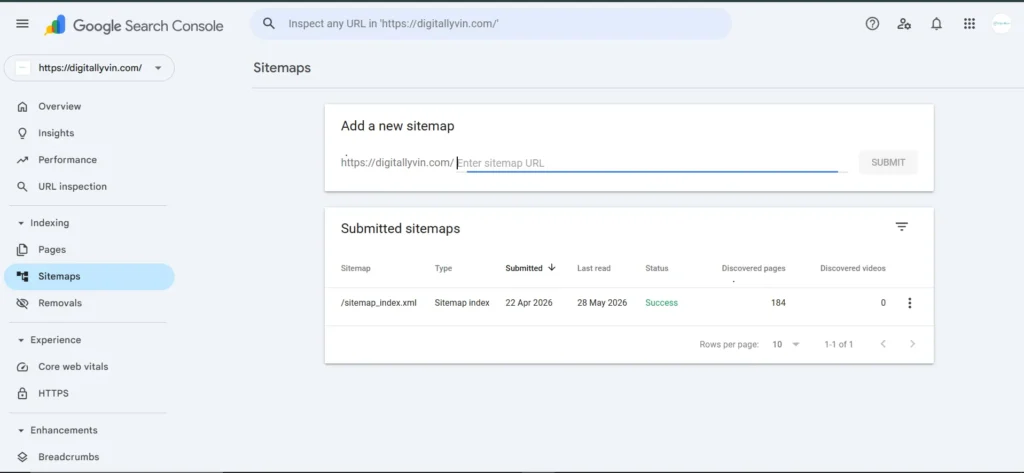
2. Submit Your Sitemap to Google Search Console
A sitemap is a file that lists all the pages on your blog and tells Google exactly where to find them. Without it, Google has to discover your pages on its own — which takes much longer.
Steps to follow:
- Install Yoast SEO or Rank Math (both free) — they auto-generate your sitemap
- Your sitemap URL is usually: yoursite.com/sitemap.xml
- Go to Google Search Console → Sitemaps → paste your sitemap URL → Submit
- Use the URL Inspection tool to check if specific posts are indexed
If a page isn’t indexed, it literally cannot rank on Google. This is one of the most important — and most overlooked — steps on this entire checklist.
3. Make Your Blog Mobile-Friendly
Google uses mobile-first indexing — meaning it ranks your website based on how it looks and performs on mobile, not desktop. If your blog looks broken on a phone, your rankings will suffer.
Mobile checklist:
- Text is readable without zooming
- Buttons are large enough to tap easily
- No horizontal scrolling required
- Images resize properly on small screens
- Pages load fast on mobile data
Free tool: Google Mobile-Friendly Test — just paste your URL and it tells you exactly what to fix.
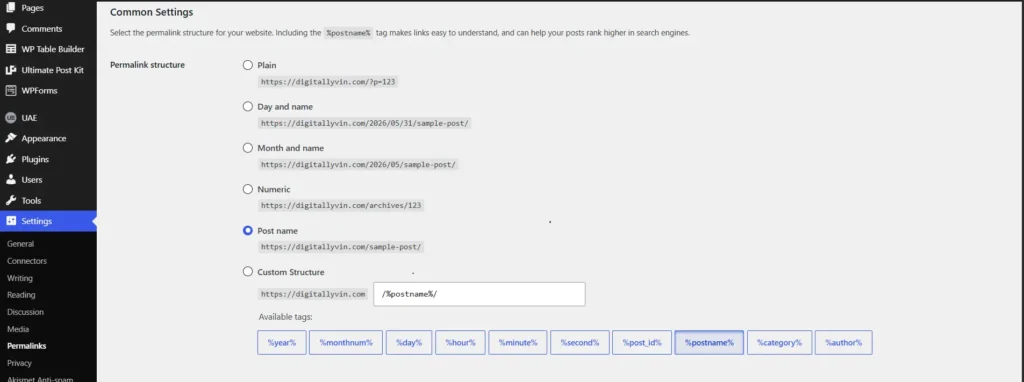
4. Fix Your URL / Permalink Structure
Your URL tells both Google and readers what a page is about before they even click on it. A messy URL like yoursite.com/?p=1234 gives Google nothing to work with. A clean one like yoursite.com/technical-seo-checklist-for-bloggers/ is clear, keyword-rich, and clickable.
Best practices:
- Keep URLs short and descriptive
- Use hyphens between words (not underscores)
- Include your main keyword naturally
- Remove dates, symbols, and random numbers
- Never change a URL after it’s live unless you set up a 301 redirect
In WordPress: Go to Settings → Permalinks → select “Post name” → Save. Done.
5. Use Smart Internal Linking
Internal links connect your blog posts to each other. They help Google understand your site structure, distribute authority across pages, and keep readers exploring your blog longer — all of which improve rankings.
When I was building the content cluster strategy on DigitallyVin.com, internal linking was the step that made everything click. Each post linking to related posts created a web of authority that Google could follow.
Best practices:
- Add 3–5 internal links per article
- Use descriptive anchor text (not “click here”)
- Link to related, genuinely helpful content
- Always link new posts back to your pillar pages
6. Optimize Your Images (Alt Text, Size & Format)
Unoptimized images are one of the biggest reasons blogs load slowly. A single 5MB image can slow your entire page down — and most bloggers don’t even realize they’re uploading such large files.
Best practices:
- Always compress images before uploading (TinyPNG or Squoosh are free)
- Use WebP format where possible — it’s smaller than JPEG with the same quality
- Rename image files descriptively before uploading (e.g. technical-seo-checklist.webp not IMG_4523.jpg)
- Add alt text to every image — describe what’s in the image using your keyword naturally
Alt text also helps your images appear in Google Image Search, which is a free additional traffic source most bloggers completely ignore.
7. Enable HTTPS & SSL Security
If your blog URL still starts with http://instead of https://, Google flags it as “Not Secure” — and both Google and visitors will trust it less. HTTPS is a confirmed Google ranking factor.
How to fix it:
- Most hosting providers (Hostinger, Bluehost, SiteGround) offer free SSL through Let’s Encrypt — activate it in your hosting dashboard
- In WordPress, update your site URL to https://under Settings → General
- Install a plugin like “Really Simple SSL” to redirect all HTTP traffic to HTTPS automatically
- Check for mixed content warnings using the free SSL checker at whynopadlock.com
This is a one-time fix that takes under 10 minutes and immediately makes your blog more trustworthy.
8. Add Schema Markup (Structured Data)
Schema markup is code that tells Google exactly what type of content is on your page. It’s what enables rich snippets — those star ratings, FAQ dropdowns, and author details you see in search results that get far more clicks than regular results.
Recommended schema types for bloggers:
- Article / BlogPosting — tells Google this is a blog post
- FAQ schema — makes your FAQs appear as expandable dropdowns in search results
- Breadcrumb schema — shows your site navigation in search results
- Author schema — builds your E-E-A-T credibility with Google
How to add it without coding: Rank Math (free) adds schema automatically based on your post type. Just select “Article” or “FAQ Page” from the Schema tab in your post editor.
9. Optimize for AI Search & Answer Engines (2026 Update)
This is the newest item on this checklist — and one of the most important for 2026. Google’s AI Overviews, ChatGPT search, and Perplexity are all pulling answers directly from blog content. To get referenced in these AI answers, your content needs to be structured in a way AI can easily read and extract.
How to optimize for AI search:
- Use clear H2 and H3 headings that directly answer questions
- Write short, direct answer paragraphs (2–3 sentences) right after each heading
- Add FAQ sections with clearly worded questions and concise answers
- Keep your page speed high — AI crawlers deprioritize slow pages
- Use structured data (schema) so AI systems understand your content type
Bloggers who optimize for AI search now are building a significant traffic advantage for the next 2–3 years.
10. Check Your Robots.txt File
Your robots.txt file tells search engines which pages they can and cannot crawl. A misconfigured robots.txt can accidentally block Google from accessing your entire blog — and you’d never know until you checked.
How to check it: Type in your browser. You should see a simple text file.
What to look for:
- Make sure important pages are NOT blocked (Disallow: / blocks everything — that’s bad)
- CSS and JavaScript files should be accessible to Google
- Your sitemap URL should be listed at the bottom
What’s safe to block: Tag pages, author archive pages, and search result pages — these create duplicate content issues if left crawlable.
Free Technical SEO Tools Every Blogger Should Bookmark
Tool | What it does | Cost |
Google Search Console | Indexing, sitemap, coverage errors | Free |
Google PageSpeed Insights | Core Web Vitals score | Free |
Screaming Frog SEO Spider | Full site crawl (up to 500 URLs) | Free |
TinyPNG / Squoosh | Image compression | Free |
Rank Math / Yoast SEO | Schema, sitemap, on-page SEO | Free |
Google Mobile-Friendly Test | Mobile usability check | Free |
You don’t need a single paid tool to complete this entire checklist. Everything above is 100% free.
Technical SEO Mistakes Bloggers Make (And How to Avoid Them)
After auditing my own blog and studying what holds beginner blogs back, these are the most common mistakes I see:
1. Never submitting a sitemap — Google finds your pages eventually, but submitting a sitemap speeds up indexing significantly. Do it on day one.
2. Uploading images straight from the camera — phone photos are often 3–5MB each. Always compress before uploading. Always.
3. Changing URLs after publishing — this breaks existing links and loses any SEO value that page has built. If you must change a URL, always set up a 301 redirect.
4. Installing too many plugins — every plugin adds code that slows your site. Audit your plugins every 3 months and remove anything you don’t actively use.
5. Ignoring Google Search Console — this free tool tells you exactly which pages have errors, which keywords you’re showing up for, and which pages aren’t indexed. Check it at least once a week.
6. Skipping alt text on images — this is free SEO that takes 10 seconds per image. There’s no excuse to skip it.
For a broader look at what holds beginner blogs back, read my guide on 10 SEO mistakes new bloggers must avoid.
FAQs — Technical SEO Checklist for Bloggers
1. Do I need paid tools to do technical SEO as a blogger?
No — and this is probably the biggest myth beginners believe. Google Search Console, PageSpeed Insights, Google’s Mobile-Friendly Test, and Rank Math (free version) cover everything on this technical SEO checklist for bloggers without spending a single rupee. Paid tools like Ahrefs or SEMrush are useful later, but completely unnecessary when you’re starting out.
2. How long does it take to see results from technical SEO fixes?
Some fixes show results within days — submitting your sitemap, for example, can get new pages indexed within 24–48 hours. Speed improvements can impact rankings within 2–4 weeks. Overall, expect to see meaningful ranking changes within 4–8 weeks of completing this checklist, depending on your niche competition.
3. Can I do technical SEO without any coding knowledge?
Absolutely. Every single item on this checklist can be completed using WordPress settings, free plugins like Rank Math or Yoast, and your hosting dashboard. I have zero coding background and completed all of these on DigitallyVin.com myself.
4. Is technical SEO a one-time task?
It’s mostly a one-time setup with regular monitoring. Complete the checklist once, then check Google Search Console weekly for new errors, audit your page speed every few months, and revisit this checklist whenever you add new features or plugins to your blog.
Conclusion + Download Your Free Checklist
Technical SEO is the foundation every blog needs before anything else can work. The best content in the world won’t rank on a slow, unindexed, mobile-unfriendly website.
The good news? Every fix on this list is free, beginner-friendly, and takes less time than writing one blog post.
Your action plan starting today:
- Run your blog through Google PageSpeed Insights
- Check Google Search Console for indexing errors
- Submit your sitemap if you haven’t already
- Work through the checklist one item at a time
You don’t need to fix everything in one day. Even completing 3–4 items this week puts your blog ahead of most beginners. Want to track your progress? Download the free checklist PDF and tick off each item as you complete it.
Which technical SEO fix are you starting with today? Drop it in the comments — I’d love to know where you’re beginning and help if you get stuck.
And if you want more beginner-friendly SEO tips, tools, and real case studies delivered to your inbox, subscribe to the DigitallyVin newsletter. No fluff — just practical strategies that actually work for beginner bloggers.
You are so cool! I do not suppose I’ve read through something like that before.
So good to discover another person with some genuine thoughts on this subject matter.
Seriously.. thanks for starting this up. This web site is one
thing that is needed on the web, someone with some originality!
Thank you for your Kind words! I’m really glad you found the article helpful. I’ll continue sharing more useful insights, feel free to explore other articles on the site as well.